


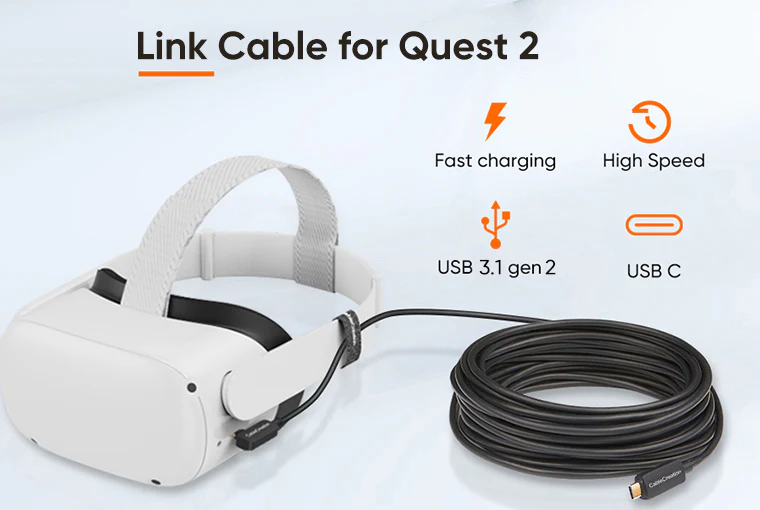
Fiber-Optic Cable
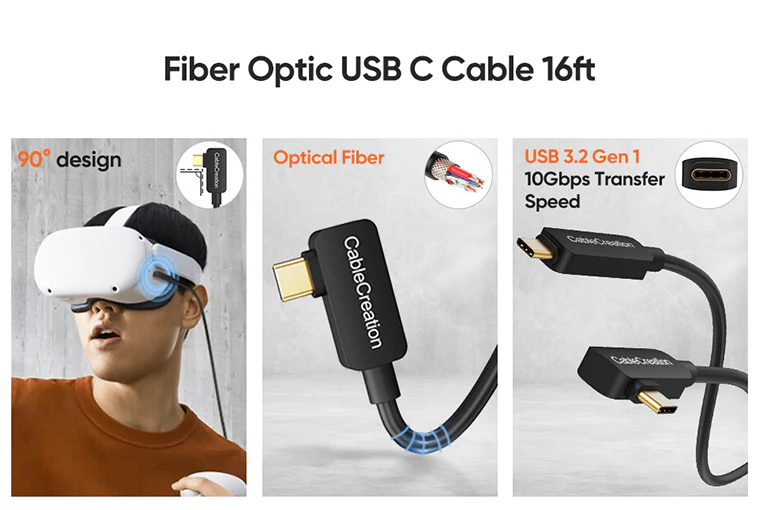
This Fiber-Optic cable is lighter, flexible, supports 10Gbps fast transmission speed, low latency and minimum signal loss,offer exceptional performance while playing your VR gaming without distortion.Cable only weights 195g.
Enjoy PC-VR Gaming
This premium usb c link cable delivers exceptional performance for PC VR gaming on your Quest and Quest 2 while simultaneously powering the headset – supports 3A fast charging to allow charging while playing

Right-Angled Design
Right-angled design perfectly match the Oculus Quest and Oculus Quest 2 VR headsets, which does not stick out and provides you a comfortable grip; the 90 degree angle USB C male port connect with you VR Headset,the another USB C male port connect with your PC.
16FT PC Link Cable for Quest 2
16ft link cable is long enough that allows you to move freely without restricted,flexible, durability and lightweight,you can enjoy your VR gaming time or movies,more better experience.
We offer 2 Cable straps which can secure the cable to the side of the headset for strain relief.
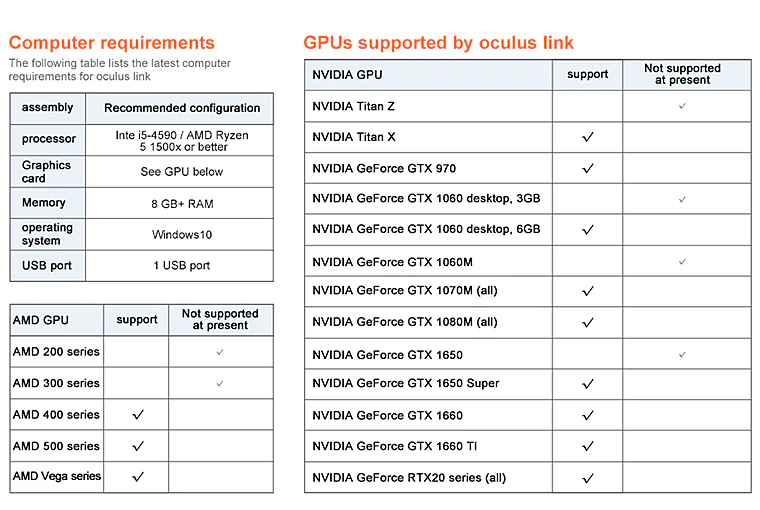
Computers & GPUs requirements by Oculus lin
Confirm the following:
• Your PC meets the recommended specs.
• Your Oculus software is up-to-date on both your PC and your Quest.If you’re unable to enable Link Cable:
• If you don’t see Add Quest as the device on the PC software: log out of the PC software and log back in.
• If you don’t see the Enable Link pop-up on the PC software: log out of the PC software and log back in.
• If you don’t see the Enable Link option under Settings on Quest: completely power off the headset and restart.
Why does the cable show up as USB 2.0 in the oculus app when I connect to my computer?
- 1.we suggest that you check your computer’s GPUs supported by Oculus link;
- 2.you need to connect this cable to the USB 3.0 ports on your computer port,easiest way to tell is to see if the tab inside the port is blue;
- 3.log out of the APP and log back in.
FAQ
- It will fast charge when 3A/5V,but you know that according to Oculus the Quest 2 is not made to stay fully charged while playing. When using our cable or the official Link cable and you start out at 100% charged the Quest 2 will die until it gets to around 80% and then stay around that while playing.
- it does not provide a sufficient charge to the headset while playing when plugged into a PC USB C port,the battery drains faster than the cable tops it up. We suggest you charge it first before you start playing,it’s a better experience, the PC motherboard doesn't support enough power through USB-C connections.
Yes, our store offer the USB C Female to USB Male(B074V49MDK),it compatible with Oculus Quest/Quest 2 VR, Oculus Rift Sensor, support 3A fast charging.
Please follow the steps: 1) check your computer's GPUs supported by Oculus link; 2) connect this cable to the USB 3.0 ports on your computer port, the easiest way to tell is to see if the tab inside the port is blue; 3) log out of the APP and log back in.
Yes, it is a Fiber Optic Quest Link Cable, which means that is no delay,more amps of power, and it makes the data delivery better.
- it is worth ,it is lighter, flexible compare with other brands cable for Quest 2.
- If you need absolute-zero latency for competitive gaming, then this is the closest you'll get.
Adding {{itemName}} to cart
Added {{itemName}} to cart